-2.png?width=221&height=60&name=Navigo_Logo_High_Res%20(1)-2.png)
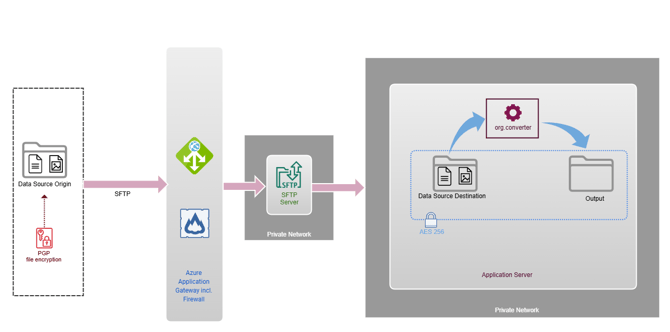
Data Transfer Features over SFTP
|
SFTP Transfer |
Secure data transfer from data origin to org.manager application server can also be achieved via SFTP. The SFTP service is accessed via a separate URL over a non-standard port. For the authentication, customers are required to provide a public RSA key, 4096-bits in size. |
|---|---|
|
Azure Firewall |
Continuous protection against DDoS attacks. |
|
Encryption at Rest |
Symmetric AES 256 encryption on the org.manager server disk is used to protect the folders storing the input data files and the output. |
|
org.converter |
Once the data is transferred, org.converter can be scheduled to process the input files and produce a new output. |
|
Retention Cycle |
|
|
PGP Encryption (optional) |
In addition to the encryption in transit granted by the SSH transport layer of SFTP, the data files themselves can be encrypted using PGP. If PGP is enabled, Navigo will provide an asymmetric public key for the files to be encrypted before transferring them across. This key can be 1024, 2048, 3072 or 4096 bits in size. |