-2.png?width=221&height=60&name=Navigo_Logo_High_Res%20(1)-2.png)
The screenshots and options below are based on our default configuration and may vary from your environment.
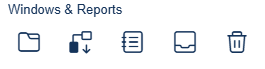
From left to right the icons and their functions are:
-
Overview Window
-
The overview window allows you to go back to previous models from older data sets.
-
-
Simulation Report
-
This report summarises the changes within your model, compared with the original data set.
-
-
Modelling Log
-
This report tracks the changes that have been made within the model, when they were made and by which user.
-
-
Clipboard
-
Objects (e.g. Org Units, Positions or People) that you copy will appear in your clipboard.
-
-
Recycling Bin
-
Objects you delete will appear in your recycling bin
-
These objects can be reinstated from the recycling bin by selecting the arror icon next to the item.
-