-2.png?width=221&height=60&name=Navigo_Logo_High_Res%20(1)-2.png)
org.manager for SuccessFactors (OMSF) integrates with your environment by utilizing the OData API to identify assigned SuccessFactors role names. While OMSF does not inherit permissions directly from SuccessFactors, it uses these role identities as the foundation for its own security configuration.
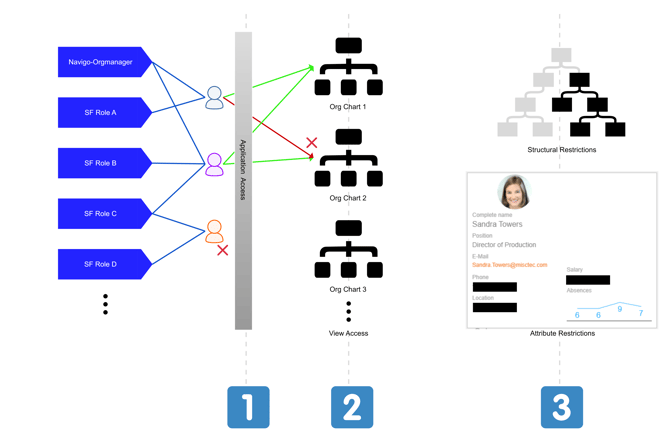
Security is managed through three distinct "gates" or access controls:
1️⃣ Application Access: To access any org.manager resource, users must be assigned a foundational SuccessFactors role (typically named Navigo-Orgmanager). This role serves as a simple entry requirement and does not require any functional permission assignments within SuccessFactors itself.
2️⃣ View-Level Access: Once application access is established, the second gate governs which specific views are available to each role. For example, users with an HR Admin role could be granted access to an org chart with remuneration information, users with a Business Partner role could be granted access to a modelling view, etc…
3️⃣ Data-Level Restrictions: For scenarios requiring more granular control, a third layer restricts visibility within the views. There are two types of restrictions:
-
Structural Restrictions: These limit visibility to specific branches of the hierarchy. If a user should only see a specific subtree rather than the entire organisation, this control uses an identifiable association between the user and the "top" object of their permitted view.
-
Field Restrictions: These protect sensitive data by hiding specific fields. Visibility is governed by custom rules that define which audiences can view which target data points.