-2.png?width=221&height=60&name=Navigo_Logo_High_Res%20(1)-2.png)
The Overview Window is used for navigation to previous models. To return to a previous version of a model you have been working on:
-
Access the Overview Window icon under “Simulation” in the toolbar.
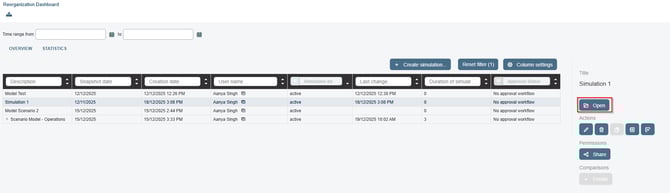
Once in the Overview Window, find the simulation you are wanting to retrieve.
-
To easily navigate to your previous model, you can use the filters.
-
Filter by description and search for the name of your model.
-
Filter by ‘Creation Date’ to narrow the results by the date the model was made.
-
Filter or reorder by 'Last Change' to identify the model last worked on.
-
Once you’ve identified the correct model, select the row and then select ‘Open’ on the right.