-2.png?width=221&height=60&name=Navigo_Logo_High_Res%20(1)-2.png)
What's new?
1. Capture the story behind every simulation
Keep the context for your org design work right where the work happens.
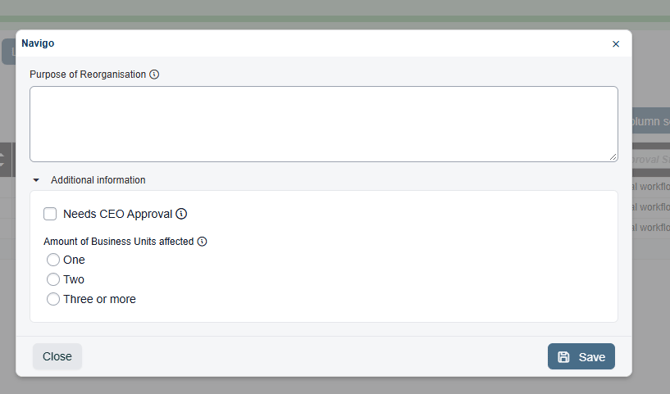
Each simulation can now carry its own set of supporting meta information, such as the business rationale, project sponsor or consultation status. Your team fills it in from a dedicated dialog simulation overview, so anyone working on the simulation sees the full picture.
- Your fields, your way: We set up the fields according to your organisation's needs, including text, checkbox and file fields, each with its own label and instructions to guide whoever fills it in.
- Tidy groupings: related fields can be grouped into sections that expand and collapse.
- In your prints: the meta information can be included when printing from a simulation, so the PDF or PowerPoint export contains more context.
- Controlled editing: only users with write access to the simulation can update the meta information. Everyone else can view it.
The fields are set up once in configuration. Get in touch with the Navigo support team and we'll help you decide what to capture and set it up for you.
2. Sharper insights across your simulations
See which org design projects are moving, which have stalled and which are done.
The overview of activity across all your simulations, picks up new measures and filters in this release.
- Active Days: shows the number of days work actually happened in a simulation, so you can tell a busy project from one that's gone quiet. It works for past simulations too and can be used to filter and sort. The existing Duration measure is now clearly shown in days.
- Complete status: simulation owners and admins can mark a finished simulation as Complete. Completed simulations are locked against further changes, counted in the statistics and any approval workflow in progress is finalised. A prompt explains what will happen before you confirm, and admins can set a simulation back to Active if needed.
- Quick time period filters: the Overview and Statistics tabs now show the last three months by default, with This Month, Last 3 Months and This Year available in one click.
- See your simulation usage at a glance: the simulation overview now shows how many simulations you’re using against your licensed limit, with a progress bar that flags when you reach 75% and turns critical at 90%. It’s a handy prompt to tidy up simulations you no longer need before you hit the cap.

Also in this release
- Export conflicts after a simulation refresh: when refreshing a simulation brings up conflicts, you can now export them to CSV straight from the results dialog, making them easier to review, share and work through.
- Safer SFTP key management: saving SFTP connection settings no longer replaces the security key by accident, so a key you've already shared stays valid. Generating a new key is now a separate step that asks you to confirm first.
Want a hand with any of these features, or curious what they could do for your organisation?
Reach out to the Navigo support team and we'll get you sorted.