-2.png?width=221&height=60&name=Navigo_Logo_High_Res%20(1)-2.png)
Overview
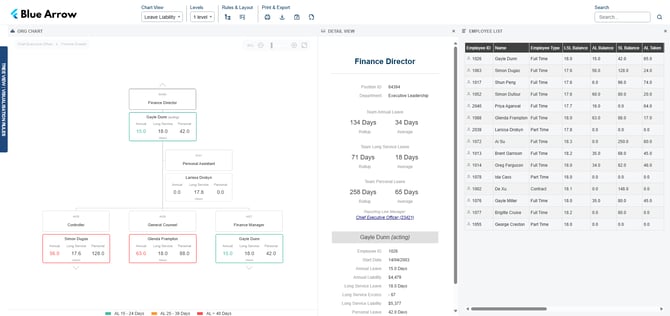
The Leave Liability Chart overlays leave data onto your org chart, showing Annual Leave, Long Service Leave and Personal Leave balances for each employee at a glance. It helps HR teams and managers identify leave liability risks, spot employees with high balances and understand the financial exposure sitting across their teams.
This chart is designed for users who need visibility over workforce leave data. It's typically used by HR teams and authorised managers to monitor leave health and support workforce planning decisions.
Objectives
- Give HR staff and managers a complete view of leave balances across the organisation
- Identify employees with high or excess leave balances before they become a financial risk
- Surface leave liability values to support budgeting and workforce planning
Required fields
To get the most out of this chart, the following fields are generally recommended:
- Annual Leave Balance
- Long Service Leave Balance
- Personal Leave Balance
Additional Optional Fields (can also be calculated by org.manager)
- Annual Leave Liability
- Long Service Leave Liability
- Long Service Excess
- Annual Leave Taken
- Personal Leave Taken
- Employee Start Date
Conditional Formats
The following display options can be toggled to customise what appears on the chart:
- Show Occupants — displays the name of the employee filling a position
- Show Only Vacancies — filters the chart to show unfilled positions only
Legend
Each employee card is colour-coded to indicate their Annual Leave balance range at a glance:
- Green — AL Balance 15–24 days
- Orange — AL Balance 25–39 days
- Red — AL Balance 40+ days
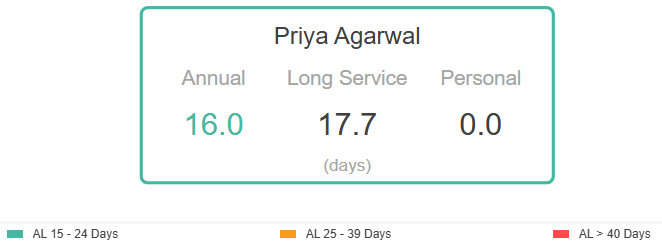
Slider controls allow you to set custom thresholds for the AL Balance (≥) and AL Balance (≤) ranges, so the chart highlights what matters most to your organisation.
The criteria for this legend can be customised. A different field or threshold range can be used to suit your team's leave management approach.
Vacant positions
Vacant positions will appear in the chart structure. Use the Show Only Vacancies conditional format to filter the chart down to unfilled roles only.
Formulas
The Leave Liability Chart supports the following calculated fields:
- Team Annual Leave Rollup
- Team Annual Leave Average
- Team Long Service Leave Rollup
- Team Long Service Leave Average
- Team Personal Leave Rollup
- Team Personal Leave Average
- Liability Rollups
Security
This chart is intended for HR administrators and authorised managers only. Access can be restricted to a specific user group to ensure leave liability and financial data is only visible to the right people. During implementation, we will workshop your specific security requirements.
Mapped fields
The fields shown in this chart are fully customisable. If there's something your team needs to see (or doesn't), we can configure the chart to match — just let us know.