-2.png?width=221&height=60&name=Navigo_Logo_High_Res%20(1)-2.png)
Overview
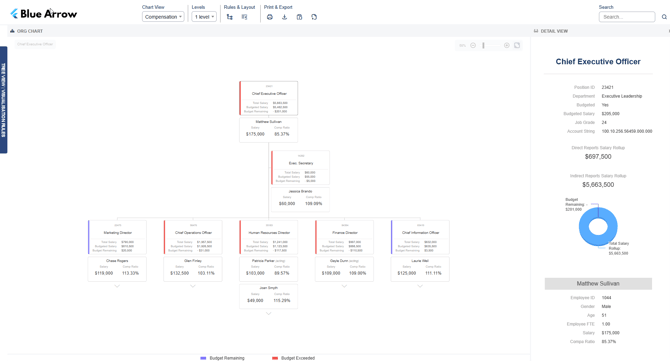
The Compensation Chart overlays compensation and budget data onto your org chart, showing each position's total salary, budgeted salary and budget remaining at a glance. It also surfaces individual employee salary and compensation ratio, helping teams quickly identify where spend is tracking against budget and where variances exist.
This chart is designed for users with financial accountability across the organisation. It's typically used by People & Culture, Finance and authorised managers to support cost control, budget reviews and strategic workforce planning.
Objectives
- Align financial planning across teams by surfacing salary and budget data in a single view
- Give HR and finance visibility over compensation spend against budget
- Support cost control by highlighting positions where budget has been exceeded
Required fields
To get the most out of this chart, the following fields are generally recommended:
- Employee Salary
- Position Salary
- Budgeted Salary
- Job Grade
- Compensation Ratio
- Additional Employee Allowances
Conditional Formats
The following display options can be toggled to customise what appears on the chart:
- Show Occupants — displays the name of the employee filling a position
- Show Only Vacancies — filters the chart to show unfilled positions only
The position card border colour indicates budget status at a glance, driven by the legend rules below.
Legend
Each position card displays a colour-coded border to indicate budget status:
- Blue — Budget Remaining
- Red — Budget Exceeded
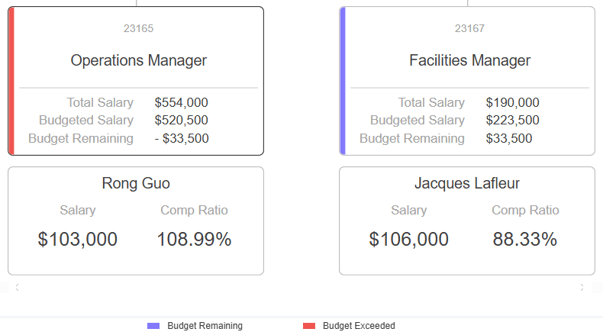
This makes it easy to spot over-budget positions across the structure without needing to open individual records.
The criteria for this legend can be customised. Different thresholds or field categories can be applied to suit your organisation's budget management approach.
Vacant positions
Vacant positions will appear in the chart structure and will display budgeted salary and budget remaining where that data is available.
Formulas
The Compensation Chart supports the following calculated fields:
- Total Salary (Direct Reports Rollup)
- Indirect Reports Salary Rollup
- Budget Remaining
- Direct Reports Salary Rollup
- Total FTE
- Total Expenditure
- Total Budget
Security
This chart is intended for authorised users only. Access is typically restricted to People & Culture & Finance. During implementation, we will workshop your specific security requirements to ensure sensitive remuneration data is only visible to the right people.
Mapped fields
The fields shown in this chart are fully customisable. If there's something your team needs to see (or doesn't), we can configure the chart to match — just let us know.