-2.png?width=221&height=60&name=Navigo_Logo_High_Res%20(1)-2.png)
Overview
Access Protection is an org.manager security feature that controls the objects a user can visualise upon login. It is possible to have different degrees of access depending on the employee record associated to users.
In org.manager, things can be configured to control access at different levels:
-
At the attribute level (e.g. employee id, salary, position title, etc…).
-
At the perspective level (e.g. basic chart, org tree with budget analysis, dashboard, etc…).
-
At the features level (e.g. data exports, PDF exports, search, etc…).
-
At the hierarchical level (structural access).
How it works
org.manager utilises information from two sources to determine the level of access a user should be granted:
-
The user identifier detected at login time
+ -
The HR data used to build the organisational charts (typically being updated with the current records of employees, positions, etc…)
The application maps the Unique User Identifier (Name ID) passed during single sign on with an employee record in the HR data.
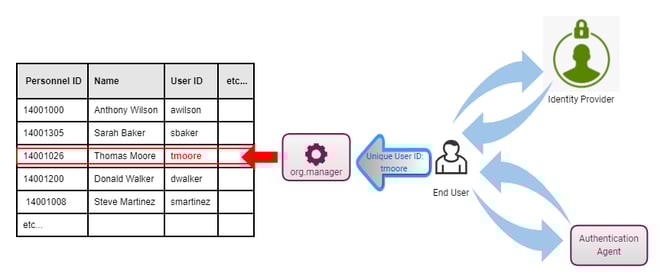
org.manager - Person record mapping after successful login
Having the Unique User Identifier as part of the person data attributes imported into org.manager is essential for the application to determine what record in the data is associated with the user who has logged in.
After the authentication process completes and the employee record linked to the user is established, the application then proceeds to work out what level of access they should be granted using the list of security rules.
Security rules are pre-configured conditional logic using the HR data imported into org.manager. The conditions can be directly related to the user’s employee record, or to an object linked to it (e.g. position, org unit, job, etc).
Depending on which conditions are met by their employee record, users can be granted more or less access. For instance, a user in a management role might be required to have access to additional perspectives besides the basic organisational chart, remuneration and budgeting attributes, a more comprehensive set of perspectives including dashboards and sunburst diagrams, and additional options to allow them to run data exports or create simulations for organisational modelling.
On the other hand, general users might only be granted access to a subset of data attributes (non sensitive information), some basic charts with restricted access to just their teams and only a few options to print to PDF and search.
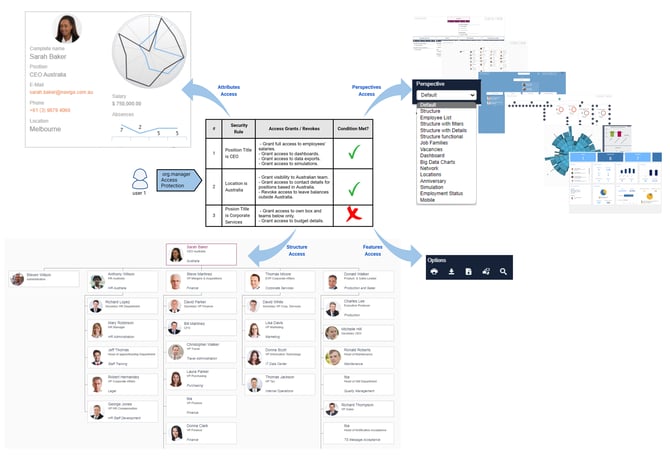
org.manager - Access granted to users that meet rules 1 and 2
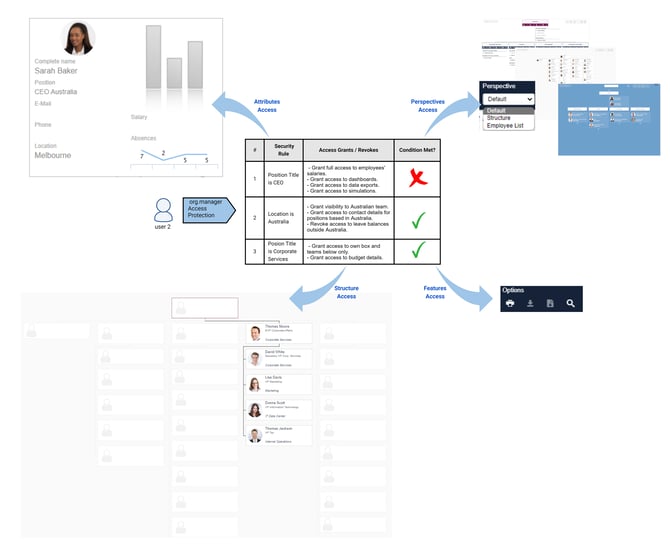
org.manager - Access granted to users that meet rules 2 and 3
External Users
As mentioned in the previous section, the access in org.manager is highly dependent on the employee record linked to each user. As such, the application requires for the users accessing it to be part of the HR data being charted.
In the event of requiring to grant access to people who are not part of the organisational hierarchy being rendered in org.manager, this can be achieved by automating the creation of artificial records for external users.
Recommendations
Keep the access protection rules as simple as possible. In most cases, it is possible to handle all the required access scenarios with just a few rules.
Avoid hard coding personnel IDs in the access protection rules as much as possible.
Custom fields included in the HR data imported into org.manager can be a viable solution when wanting to control the access directly from the HRIS.
Access protection is the most important feature to test before going live with your org.manager organisational charts. Make sure all the possible scenarios are thoroughly tested.