-2.png?width=221&height=60&name=Navigo_Logo_High_Res%20(1)-2.png)
What's new?
New Module: Modelling Dashboard
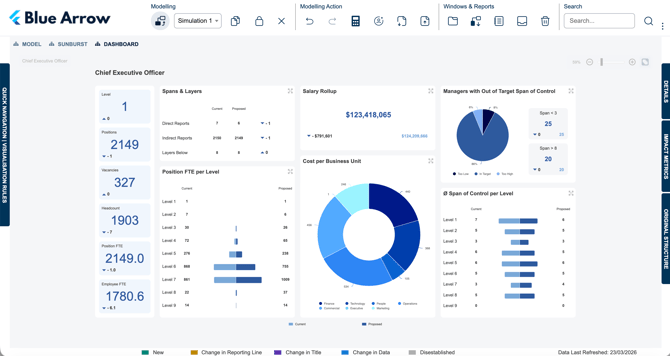
Plan restructures with confidence — see the full picture before you commit.
Organisational redesign is rarely straightforward. Whether you're planning a restructure, rightsizing a team, or modelling a leadership change, the real challenge is understanding the downstream impact before it happens.
The new Modelling Dashboard is built for exactly that. It sits alongside the existing Model and Sunburst tabs and gives you a live, side-by-side view of how your proposed structure compares to your current state without having to switch between views or export data to piece the story together.
For HR business partners, finance teams, and executives reviewing workforce scenarios, this means faster, better-informed decisions with fewer surprises.
The dashboard includes the following widgets:
-
Spans & Layers — Compare direct reports, indirect reports, and layers below for any selected position across current and proposed structures.
-
Salary Rollup — See the total salary cost of your proposed structure and the variance against the current state.
-
Position FTE per Level — A level-by-level breakdown showing exactly where headcount shifts.
-
Cost per Business Unit — Understand how cost is distributed across your business units in the proposed model.
-
Managers with Out-of-Target Span of Control — Surface managers who fall outside your target span range and see how your proposed changes affect that picture.
-
Span of Control per Level — Compare average span of control at each level of the hierarchy, current vs proposed.
Interested in adding the Modelling Dashboard to your org.manager environment?
Reach out to the Navigo support team to find out more.
Updated Chart and Dashboard Design
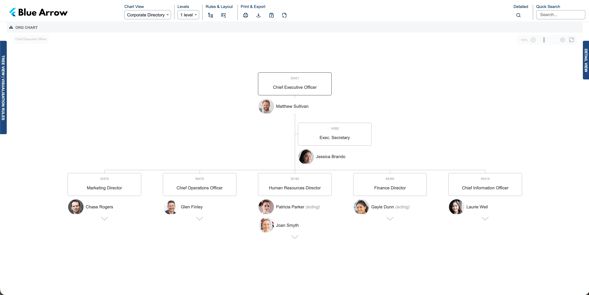
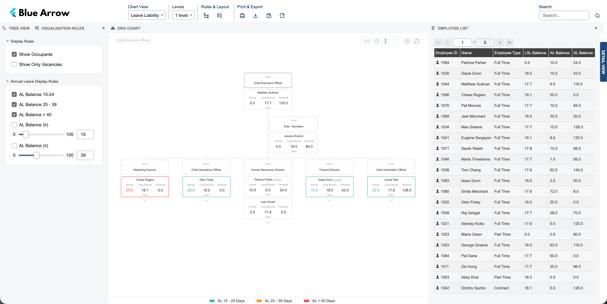
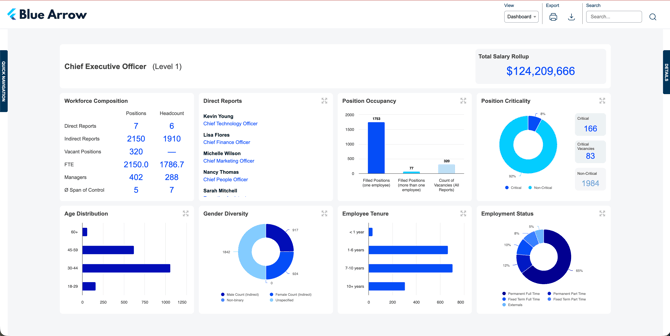
We've given the org.manager visual experience a significant refresh. The update spans both the org chart canvas and the main dashboard, introducing a cleaner, more modern aesthetic across the platform.
Org Charts now feature softer node styling, more whitespace, and an overall lighter look that makes your charts easier to read and more visually appealing.
The main dashboard has had a full visual overhaul, with a refreshed layout and updated widget designs covering Workforce Composition, Direct Reports, Total Salary Rollup, Position Occupancy, Position Criticality, Age Distribution, Gender Diversity, Employee Tenure, and Employment Status.
These are opt-in updates — your existing charts and dashboard won't change unless you choose to apply the new styling. If you're interested in updating the look and feel of your environment, reach out to the Navigo support team and we'll get you set up.